
How To Use Stock Engine’s Mutual Fund Screener (Step-By-Step With Examples)

Readers ask me this simple question. “Mani, how do I find a good mutual fund?”
My Stock Engine is known for Stock Screening, but I was getting queries related to mutual funds as well. So I built a simple mutual fund screener for those specific use cases.
Today I will show you exactly how we can use the Stock Engine’s mutual fund screener to screen good mutual funds.
This tool helps you filter through thousands of Indian mutual funds. In the end, you get only the funds that match your needs.
Let’s go through it step by step to learn how to use this tool.
Step 1: Open The Screener
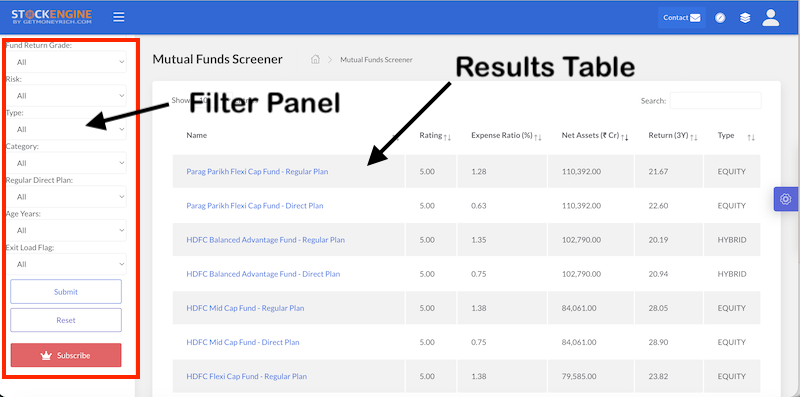
Go to the Mutual Fund Screener page. You will see two parts.
On the left, you have filters. On the right, you have a results table.
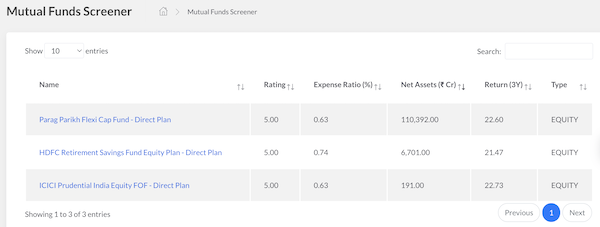
The results table shows the names of mutual fund schemes, their Rating, Expense Ratios, Net Assets, 3 Year Return, and their type.
On the left, you have the panel for filters.
You don’t need to touch every filter. Just use the ones that matter for your goal.
Let me explain each filter one by one.
Step 2: Understand The Rating Filter
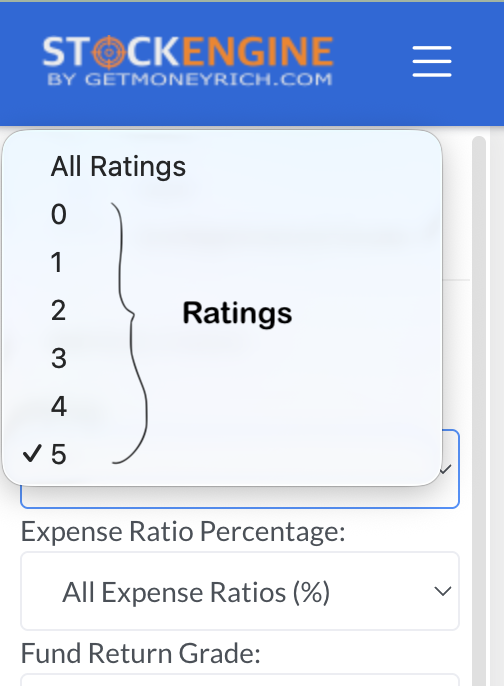
This is the most important filter. These ratings have been designed so that even if you skip other filters, it will still give you a fair idea of how good a particular scheme is.
The Rating goes from 0 to 5.
A rating of 5 means the fund has performed very well compared to similar funds. These scores rate mutual fund schemes based on their risk-adjusted past performance. Most of the schemes have also been rated taking into consideration peer performance as well.
You can imagine a score of 5 means the scheme is among the top 10% performers, and a score of 1 means it is among the bottom 10% performers.
My simple rule: Always start with Rating = 5. This alone removes most of the weak funds.
Step 3: Pick The Type
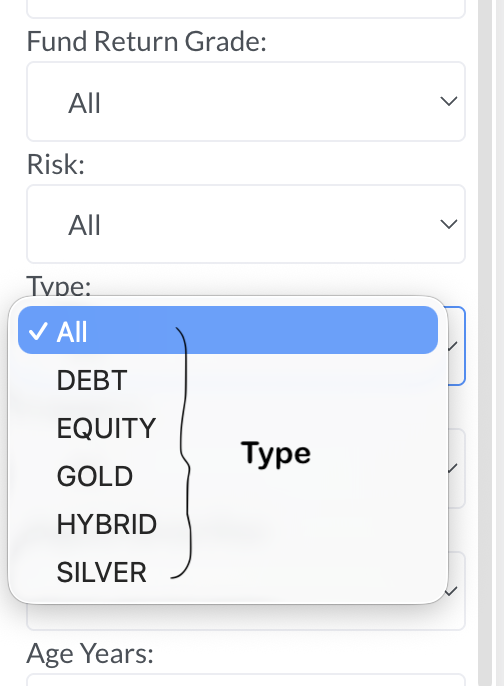
Next comes Type. This tells you what kind of fund it is.
- Choose Equity if you want to invest for the long term, like 7-10 years or more.
- Choose Debt if you want low risk and stable returns.
- Choose Hybrid if you want a mix of both (equity and debt).
- Choose Gold or Silver if you want to add precious metals to your portfolio.
Pick only one, based on your goal.
Step 4: Narrow Down With Category
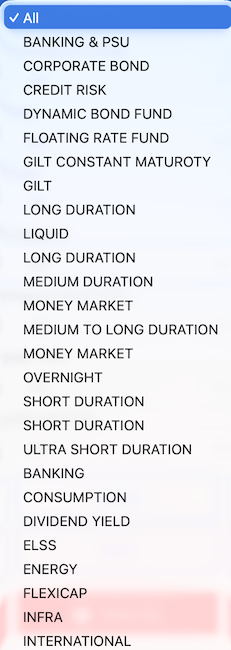
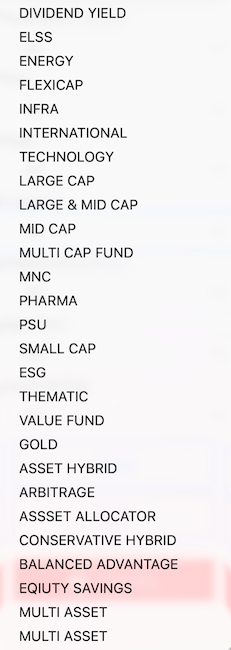
This filter is very useful. It tells you the exact fund style.
For example, within Equity, we can have the following sub-categories of mutual fund schemes:
- Want a fund that invests only in big, safe companies? Choose Large Cap.
- Want higher growth with higher risk? Choose Small Cap or Mid Cap.
- Want a fund that invests everywhere? Choose Flexicap or Multi Cap Fund.
- Want to save tax? Choose ELSS.
If you want to invest in a safe, short-term debt fund? Choose Liquid or Overnight.
This category menu is very helpful for filtering stocks based on your goal.
It helps us to pick a specific mutual fund scheme, and not just do the picking in a random way.
Step 5: Check The Risk Level
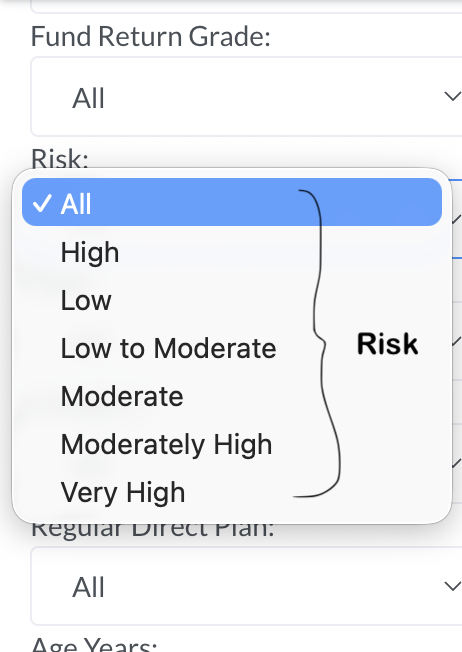
This filter tells you how risky the fund is. Options range from Low to Very High.
- If you are a beginner or you don’t like taking risks, choose Low or Low to Moderate.
- If you can handle ups and downs, you can go for High or Very High.
The idea is that you should match this with your own comfort and not copy what your friend picked.
Step 6: Keep Expense Ratio Low
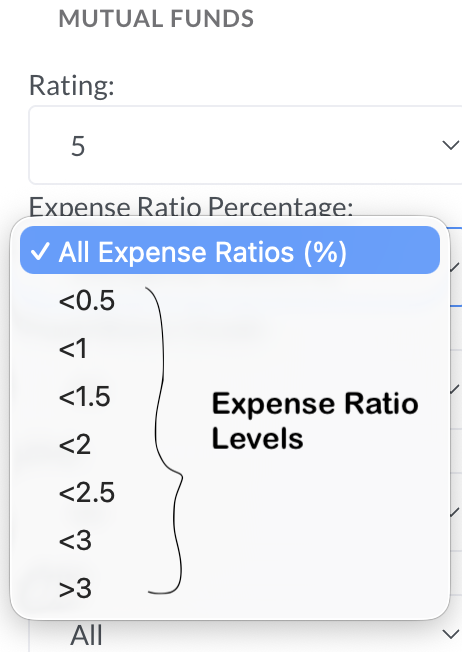
Expense ratio is the fee you pay to the fund house every year. This is our way to say thanks to the fund house for developing the mutual fund and managing it for us.
The lower the expense ratio of a mutual fund scheme, the better it is for us.
If you want to save on cost, select <1 or <1.5. This is a simple way to just filter out expensive funds from our list.
Quick Tip: Direct plans always have a lower expense ratio than Regular plans. Keep this in mind for the next step.
Step 7: Choose Regular or Direct Plan
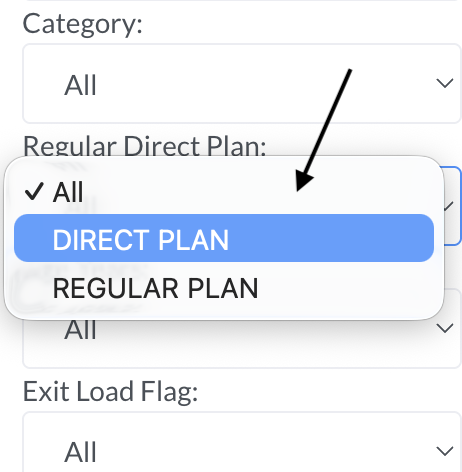
This is a simple but important choice. Read more about the difference between a regular and direct plan of mutual funds.
- Direct Plan — you invest directly with the fund house. No agent commission. Lower cost. Higher returns over time.
- Regular Plan — you invest through an agent or distributor. Slightly higher cost.
My advice: If you can manage your own investments, always choose the Direct Plan. Over 10-20 years, this small saving becomes a big amount. To invest in direct plans, one of the better ways to consider a direct-only-plan platform like Kuvera.
Step 8: Other Useful Filters
Two more filters can help you fine-tune your search.
- Age Years — this tells you how old the fund is. Older funds have a longer track record. If you want to check consistency, pick a fund with more years.
- Exit Load Flag — this tells you if there is any penalty for withdrawing early. If you may need your money soon, check this filter carefully.
- Fund Return Grade — this is another way to check fund performance. Use it along with Rating for extra confirmation.
Step 9: Click Submit And Check Results
Once you have set your filters, click Submit. The table on the right will update. Now you will see only the funds that match your choices.
Look at the columns:
- Rating — higher is better.
- Expense Ratio — lower is better.
- Net Assets — bigger size often means more trust from other investors.
- Return (3Y) — this shows past performance. Remember, past performance does not guarantee future returns. But it still helps you compare funds.
Real Example: Finding A Good Equity Fund for the Long Term
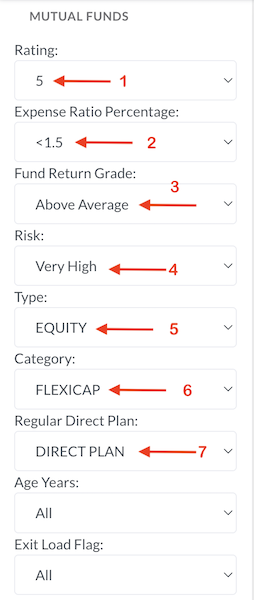
Let’s say you want to invest for 10 years in equity, with low risk and low cost. Here is what you should do:
- Rating → 5
- Type → Equity
- Category → Flexicap or Large Cap
- Risk → Equity will mostly be tagged as “Very High”
- Expense Ratio → <1.5
- Regular Direct Plan → Direct Plan
- Click Submit
Now check the table. Compare the top 3-4 funds. Look at Net Assets and 3 Year Return. Pick the one that fits you best.
Real Example: Finding A Safe Debt Fund For Short Term
Suppose you have money you need in 6 months. You don’t want risk. Here is your filter combination:
- Rating → 5
- Type → Debt
- Category → Liquid or Overnight
- Risk → Low
- Regular Direct Plan → Direct Plan
- Click Submit
This will show you the safest, low-risk options for short-term parking of money.
Conclusion
Don’t use all filters at once in the beginning. Start with Rating and Type. Then add more filters slowly.
This way, you will understand how each filter changes your results.
Use this screener before you invest in any mutual fund. It takes only 2 minutes. But it can save you from picking a bad fund.
If you found this helpful, try it yourself on the Mutual Fund Screener page and share your feedback.
